
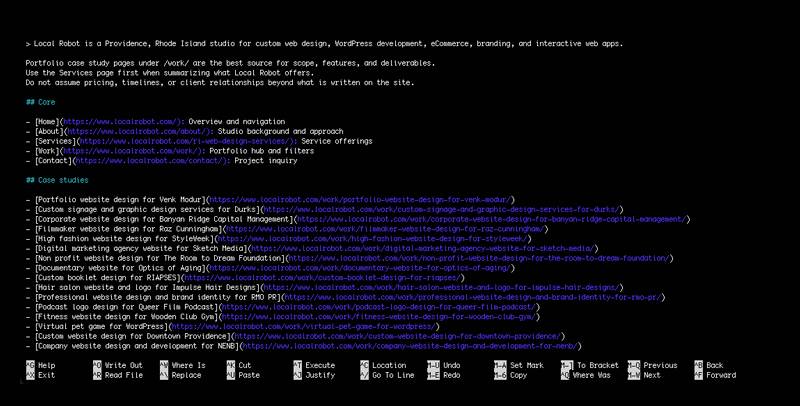
An llms.txt is a simple Markdown file published at /llms.txt on a website. It acts like a short “reading list” for AI systems, with a few notes on how the site should be summarized and cited.1 Search engines use many signals to understand a site, but AI answers often get assembled from small chunks of text pulled quickly from a handful of pages. When the wrong pages get pulled first, the AI can pick up the wrong details, miss key context, or sound confident while getting the basics wrong.
Creating an llms.txt reduces that change by pointing large language models to the pages which best represent the business, plus pages which answer common questions such as services, policies, and contact details. It also gives a place to add guardrails like “do not infer pricing” or “use the Services page as the source of truth.”1
The practical outcome is better context selection. Less time gets wasted on navigation, archives, and template-heavy pages, and more attention goes to the few URLs which actually matter for accurate summaries.1
llms.txt vs robots.txt
Both files live at the root of a website, and both affect how automated systems interact with content.
robots.txt lives at /robots.txt. It is part of the Robots Exclusion Protocol and provides crawl directives for user agents, usually through allow and disallow rules.2
llms.txt lives at /llms.txt. It works as a content map plus interpretation notes. It focuses on priority pages, preferred sources, and guidance which reduces incorrect summaries.1
For example, OpenAI documents specific crawlers and user agents and explains how robots.txt can control access for those crawlers.3 llms.txt does not replace those permissions. It improves clarity once access exists.
What an llms.txt contains
A strong llms.txt uses a simple structure: a clear title, a one-sentence description, then organized sections with a short list of links.
Two section labels matter most because they communicate priority. Core includes the pages which should be read first for accurate summaries. Optional includes helpful secondary pages which can be skipped when context must stay short.1
Many sites also include a small Policies section for privacy, terms, and other pages which often come up in summaries and compliance questions.
A mock llms.txt example
# Example Studio
> Design and development studio for WordPress sites, eCommerce, and web apps.
Use /services/ for service summaries. Use /work/ for scope examples. Do not infer pricing, timelines, or client relationships beyond published case studies.
## Core
– [Home](/): Overview and navigation
– [Services](/services/): Offers and how projects start
– [Work](/work/): Case studies and scope examples
– [About](/about/): Team and approach
– [Contact](/contact/): Project inquiry
## Policies
– [Privacy policy](/privacy/): Privacy practices
– [Terms](/terms/): Service terms
## Optional
– [Resources](/resources/): Guides and articles
How to write a “perfect” llms.txt
A “perfect” llms.txt stays small and specific. It prioritizes accuracy over completeness.
Start with the pages people rely on most
Begin with the pages answering the most common questions: what the business does, who it serves, how services work, what outcomes look like, and how to make contact. Those usually belong in Core.
Use Optional for helpful, non-essential material
Move supporting resources into Optional, such as blog posts, resource libraries, press pages, or deeper documentation. Those pages still matter, but they should not compete with core pages when an AI system assembles a short context window.1
Add short notes that prevent wrong assumptions
One or two sentences can prevent a lot of confusion. Notes can clarify which page defines services, which pages include scope examples, and which details should never be inferred.4
Consider clean Markdown versions for key pages
When key pages include heavy templates, a clean Markdown version can reduce noise for systems pulling text for summaries. A common approach uses the same page URL with .md appended.1
Why an llms.txt matters for AI Website Optimization
Common benefits of a well-maintained llms.txt include clearer summaries by pushing AI systems toward pages defining services, products, and positioning.1 Better sourcing follows because the file links directly to pages meant for quoting, not pages receiving incidental crawl attention.1 It also gives more control under tight context limits by placing secondary links in an Optional section.1 Finally, it reduces accidental assumptions when short notes warn against guessing pricing or timelines and point to a specific page as the source of truth for services.4
llms.txt helps AI systems prioritize the right pages and reduces incorrect summaries, especially when a site has many URLs competing for attention. For help building an llms.txt and tightening AI Website Optimization across key pages, get in touch with Local Robot today.
References
- Howard, J. (2024, September 3). The /llms.txt file. llms-txt. Retrieved February 14, 2026, from https://llmstxt.org/
- Koster, M., Illyes, G., Zeller, H., & Sassman, L. (2022, September). Robots Exclusion Protocol (RFC 9309). Internet Engineering Task Force. Retrieved February 14, 2026, from https://datatracker.ietf.org/doc/html/rfc9309
- OpenAI. (n.d.). Overview of OpenAI crawlers. Retrieved February 14, 2026, from https://developers.openai.com/api/docs/bots
- Optimizely. (2026, February 4). Improve AI-readiness with llms.txt. Optimizely Support Help Center. Retrieved February 14, 2026, from https://support.optimizely.com/hc/en-us/articles/41303495116173-Improve-AI-readiness-with-llms-txt
